How Much Does eBay Charge? Calculate Your Selling Fees Before You List
Wondering how much eBay charges to sell an item? Learn how to calculate eBay selling fees, final value fees, and profit with our free eBay Fee Calculator.
Calculate Your eBay Selling Fees
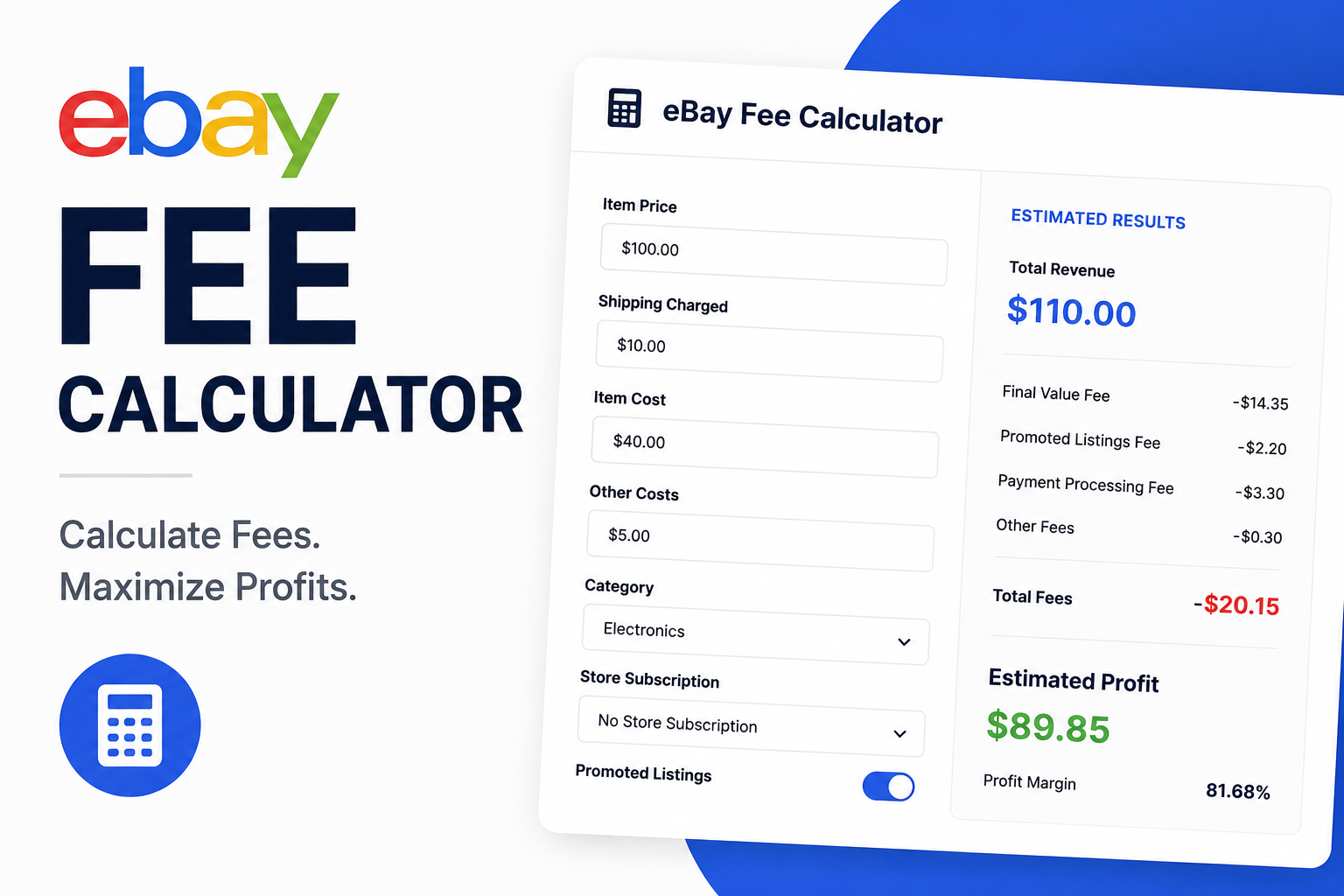
Our free eBay Fee Calculator automatically calculates final value fees, promoted listing fees, international fees, regulatory fees, store subscription discounts, and different category-specific fee structures. See your estimated eBay fees, profit, and profit margin in seconds before you list.
Open Free eBay CalculatoreBay Fee Calculators: A Guide to Margin Management, Pricing Strategy, and Profit Protection
Selling on eBay looks simple from the outside. You list something, someone buys it, the money hits your account. But if you've been doing this for more than a few weeks, you already know the truth: by the time eBay takes its cut, the payment processor takes its cut, shipping eats its share, and promoted listings quietly drain whatever's left, that forty-dollar sale is suddenly nineteen dollars. And you don't find out until after the fact, when you're staring at your payout like it must be a typo. It's not a typo. It's just math that nobody warned you about.
That's the whole case for using an eBay fee calculator. It's not sexy. It's not going viral on TikTok. But it solves a real problem: it tells you, before you ever hit "list," exactly how much of that sale price you'll actually get to keep. Whether you're clearing out a closet or running a full-time reselling operation, knowing that number in advance changes how you price, how you negotiate, and honestly how much you trust the whole process.
This guide provides a structured, data-driven analysis of eBay fee calculators, how they work, why they matter, and how to integrate them into a sustainable pricing and sourcing strategy.
Key Takeaways
- A fee calculator tells you your real net profit before you list. It accounts for category rates, shipping, promoted listings, and the per-order fee. Without it, you're guessing.
- eBay's fee is on the total transaction amount. Shipping and sales tax are included. When you fold shipping into your price, you gave eBay a bigger number to take a percentage of.
- Category rates vary significantly. Electronics are lower than clothing. Collectibles are higher than car parts. Check your category before you price.
- Promoted listings are easy to forget. They add 2–15% to your fee on top of the final value fee. Always toggle them in your calculation.
- Shipping isn't a pass-through cost. Postage, boxes, tape, and your time at the post office all eat into profit. Enter your actual shipping cost for an honest final number.
- Run the math before you source. Know your maximum allowable sourcing cost before you buy. Gross margin assumptions are dangerous.
- Make it a habit. Check before you source, before you list, before you respond to offers, and before you run promotions. Glance back after batch sales. The sellers who build this into their workflow are the ones who keep their margins where they expect them to be.
1. What an eBay Fee Calculator Actually Does
At its core, an eBay fee calculator is a simple web tool that estimates what a sale will cost you before it happens. You plug in your sale price, your category, your shipping charge, and whether you're running promoted listings. It spits back an estimate of eBay's fees and what you'd walk away with after everything gets deducted. That's it. No algorithm. No AI. Just math you'd otherwise be doing on your phone calculator at 11 PM while questioning your life choices.
But that math matters more than people think, because eBay doesn't charge one flat rate. The percentage depends on your category, your store subscription tier, your seller performance status, and whatever extra services you've opted into. Trying to keep all of that straight in your head—especially if you sell across multiple categories—is a good way to end up with numbers that feel right but are actually wrong. A calculator removes the guesswork, and the guesswork is expensive.
2. The Hidden Costs: What Actually Gets Calculated
The Total Transaction:
Here's the mistake almost everyone makes when they start: they price based on what they paid, plus whatever markup feels fair. It's natural. It's intuitive. It's also completely wrong. eBay takes its cut off the total amount the buyer pays, not just your item price. That total includes shipping. It includes sales tax, depending on where you're located. So when you offer "free shipping" and fold that eight-dollar USPS cost into your listed price, you didn't outsmart the system—you just gave eBay a bigger number to take a percentage of. The fee applies to the full transaction. A calculator handles this automatically. Your brain does not.
Category Rate Variance:
Then there's the category issue. Electronics final value fees run lower than clothing. Collectibles run higher than car parts. eBay adjusts these percentages periodically, sometimes quietly, sometimes with an announcement that gets buried in your messages. Relying on an old spreadsheet or your memory of what it used to be is how you slowly leak money without noticing.
Promoted Listings:
Payment processing is mostly baked into the final value fee these days, since eBay moved to managed payments. But promoted listings? That's where things get ugly. Promoted listings are eBay's paid advertising. You pick an ad rate—say, five percent of your sale price—and if someone buys after clicking your promoted listing, that five percent gets added on top of your regular final value fee. It's genuinely one of the easiest costs to forget, because it's optional and it doesn't show up until after the sale. A calculator that lets you toggle promoted listings on and off is useful because it shows you the real cost of that extra visibility, side by side with what you'd keep if you skipped it.
Listing Fees and Shipping Costs:
Listing fees are smaller for most sellers, since eBay hands out free listings each month. But if you're listing in bulk, using bold titles, or working in a category with different rules, those fees stack up in ways that are easy to miss individually but noticeable over hundreds of listings. And then there's shipping. Not technically an eBay fee, but it eats your profit exactly the same way. Postage, boxes, tape, padding, printer ink, the time you spend standing in line at the post office. A calculator that lets you enter your actual shipping cost separately gives you an honest final number. One that estimates it for you is lying.
3. How to Use a Fee Calculator Correctly
Getting a useful answer out of a fee calculator comes down to honesty more than anything else.
Enter realistic numbers: Enter the price you actually expect to sell at, not your optimistic list price. If you're open to offers, run the numbers at your likely offer-accept price, not your dream price. A calculator can't fix delusion.
Pick the right category: Even a small mismatch throws off the whole estimate. Selling a vintage band tee under Men's Clothing instead of Vintage can change your fee percentage. Know where you're listing.
Include real shipping costs: Put in your real shipping cost. Packaging included. If you want the number to reflect reality, account for the box, the tape, the bubble wrap, the label. The $8.45 USPS rate isn't your real cost. Your real cost is $8.45 plus materials plus time.
Add promoted listings if you're using them: Even if you're just testing what it would do to your margin. Seeing the number with and without promotion is the only way to know if the visibility is worth the cut.
Separate out your own product cost: The profit figure you're looking at should be your actual take-home, not just what's left after eBay gets paid. This is the difference between gross profit and net profit, and most new sellers never make the distinction.
4. The Full Picture: Beyond eBay's Fees
It's easy to think of fees as just what eBay charges. Your real cost of doing business is bigger. There's what you paid to source the item. Packaging materials. Postage. eBay's final value fee. Promoted listings. Applicable taxes. And if you're being honest, your own time.
A calculator that only shows eBay's side is useful, but it's half the picture. Most experienced sellers pair a fee calculator with their own tracking—letting the calculator handle eBay's fees while they keep tabs on sourcing and materials separately. The two together give you an actual bottom line. Without both, you're flying blind.
5. The Pre-Sourcing Decision: Calculators Before You Buy
Here's where fee calculators get underrated: they're not just useful before you list. They're more useful before you buy.
Plug in a realistic expected sale price for an item you're considering sourcing. Work backward through the fees. See what you'd actually walk away with. That tells you how much you can reasonably pay for inventory, which categories eat too much margin to be worth your time, and how different suppliers stack up once you account for the full cost.
Sellers who skip this step and buy inventory based purely on gross margin assumptions are the ones surprised, three sales in, by how thin their real margin actually is. The ones who run the math first know their ceiling before they ever hand cash to a thrift store cashier.
6. Testing Strategies Without Risk
A calculator is also just a safe way to test ideas before you act on them. See how your profit shifts as you raise or lower your price. Compare promoted versus non-promoted. Check whether building shipping into your price versus charging it separately actually changes your fee total—because sometimes it does, depending on how the transaction calculates. Figure out your real floor before a negotiation starts, which matters more than you think when a Best Offer comes in at 10 PM and you're tempted to just accept it and go to bed.
Most pricing mistakes trace back to skipping this step:
- Pricing based only on what you paid, without accounting for what eBay takes
- Forgetting that shipping gets folded into the fee calculation
- Accepting a lowball offer because it felt fine at a glance, then realizing later it barely covered costs
- Running promoted listings regularly without factoring the cost into your profit expectations
- Relying on fee assumptions that are simply out of date because eBay changed something and you missed the email
A calculator, used consistently, heads all of these off at once—just by putting the full cost in front of you before you commit.
7. Who Benefits Most from a Fee Calculator
Pretty much every seller benefits from checking their fees. But some get more value than others.
Casual sellers offloading personal items are often surprised by how much of a higher-value sale disappears into fees, simply because they've never had a reason to think about it before.
Part-time resellers benefit because small pricing improvements, repeated across dozens of listings, add up to real monthly income differences.
Full-time sellers benefit even more, since at scale, small inefficiencies compound into serious lost revenue over a year.
Anyone branching into a new category benefits because fee percentages don't carry over neatly. What worked in electronics won't work in clothing.
Anyone using promoted listings regularly benefits because that's the cost most likely to get lost in the shuffle without a tool actively tracking it.
8. Making It a Habit
The sellers who really get value out of fee calculators aren't the ones who check them once and move on. They're the ones who build it into how they work.
- Check before you source, to make sure there's actually margin worth chasing
- Check before you list, to set a price that protects your profit
- Check before you respond to an offer, so you know your real floor
- Check before you run a promotion, to confirm the ad cost still leaves room to profit
- Glance back after a batch of sales to see whether your assumptions held up
Treated as an ongoing habit rather than a one-time task, it's one of the simplest things you can do to keep your margins where you expect them to be.
9. The Bottom Line
Selling on eBay can absolutely be a solid, sustainable way to make money. But it depends on knowing your numbers instead of estimating them. Final value fees, promoted listings, shipping costs, and category-specific rates all combine to determine what you really walk away with, and that number is almost always smaller than people expect going in. A fee calculator takes the guesswork out. You plug in your price, your category, your shipping cost, and whatever promotional spending you're planning. You get a clear picture of what you'll actually earn before you ever commit to a listing.
That clarity is what lets you price with confidence, negotiate without second-guessing yourself, and make sourcing decisions based on real numbers instead of hope. Before your next listing goes live, take three minutes and run the math. It's a small habit. But it's one of the most reliable ways to keep an eBay business actually profitable instead of just busy.
Q&A:
Question: What is an eBay fee calculator and why do I need one?
Short answer: A web tool that estimates your total fees and net profit before you list. It accounts for final value fees, category rates, promoted listings, shipping, and other costs. Most sellers don't realize how much fees eat into their margins until after the sale—a calculator prevents that surprise.
Question: What costs should I include in my calculation?
Short answer: eBay's final value fee (category-specific percentage), the per-order fee ($0.30 or $0.40), promoted listings ad rate if applicable, shipping cost (postage plus packaging materials), and your cost of goods. Without all of these, your "profit" is a fantasy.
Question: How does the calculator help with sourcing decisions?
Short answer: Plug in a realistic expected sale price for an item you're considering buying. Work backward through the fees. That tells you your maximum allowable sourcing cost. Sellers who skip this step buy inventory based on gross margin assumptions and are surprised by how thin their real margin actually is.
Question: Why is the total transaction amount important?
Short answer: eBay takes its cut off the total amount the buyer pays, which includes shipping and sales tax, not just your item price. When you offer free shipping and fold the cost into your price, you gave eBay a bigger number to take a percentage of. A calculator handles this automatically.
Question: How often should I check my fees?
Short answer: Before you source, before you list, before you respond to an offer, and before you run a promotion. Check back after a batch of sales to see if your assumptions held up. Treated as an ongoing habit rather than a one-time task, it's one of the simplest ways to protect your margins.
Question: What is the most common pricing mistake?
Short answer: Pricing based only on what you paid, without accounting for what eBay takes. Forgetting that shipping gets folded into the fee calculation. Accepting a lowball offer because it felt fine at a glance. Running promoted listings without factoring the cost into your profit expectations. A calculator heads all of these off at once.

eFee Editorial Team
The eFee Editorial Team publishes research-driven content to help eBay sellers better understand marketplace fees, pricing strategies, shipping costs and profitability. Our articles are regularly updated to reflect the latest eBay fee structures and seller best practices.
Reviewed periodically to reflect the latest eBay marketplace fee updates.
Was this article helpful?
Your feedback helps us improve future articles.